
In the digital age, engaging website visitors is crucial for any business. Contact Button offers a comprehensive solution to enhance user interaction and capture leads.
Contact Button is an all-in-one website widget designed to boost engagement. It integrates with popular tools like Calendly, Mailchimp, and WhatsApp. This tool makes user interactions easy with its customizable interface and 15 widget apps. Whether you need a contact form or booking tools, Contact Button has it all. Discover how Contact Button can transform your website’s user experience and lead generation. Ready to learn more? Visit the Contact Button Lifetime Deal now and take your website to the next level!
Introduction To Contact Button Lifetime Deal
The Contact Button Lifetime Deal presents an excellent opportunity for businesses to enhance website engagement and lead generation. This deal offers a comprehensive solution for integrating various contact methods directly on your website. In this post, we will explore the Contact Button and its key features, along with the purpose of the Lifetime Deal.
What Is Contact Button?
Contact Button is an all-in-one website widget designed to improve user engagement and capture new leads. It offers a customizable interface with 15 Widget Apps such as contact forms, email subscriptions, and booking tools. These features streamline visitor interactions, making it easier for them to access essential information and tools.
Some of the key features include:
- Customizable Widget Menu: A dynamic interface with 15 widget apps.
- Integrations: Seamless integration with tools like Calendly, Mailchimp, tawk.to, WhatsApp, and WordPress.
- User-Friendly Setup: Easy to set up without needing a developer.
- Customizable Interface: Tailor the layout and colors to match your website design.
- Multi-Functionality: Contact forms, booking tools, and more to turn every page into a lead generator.
Purpose Of The Lifetime Deal
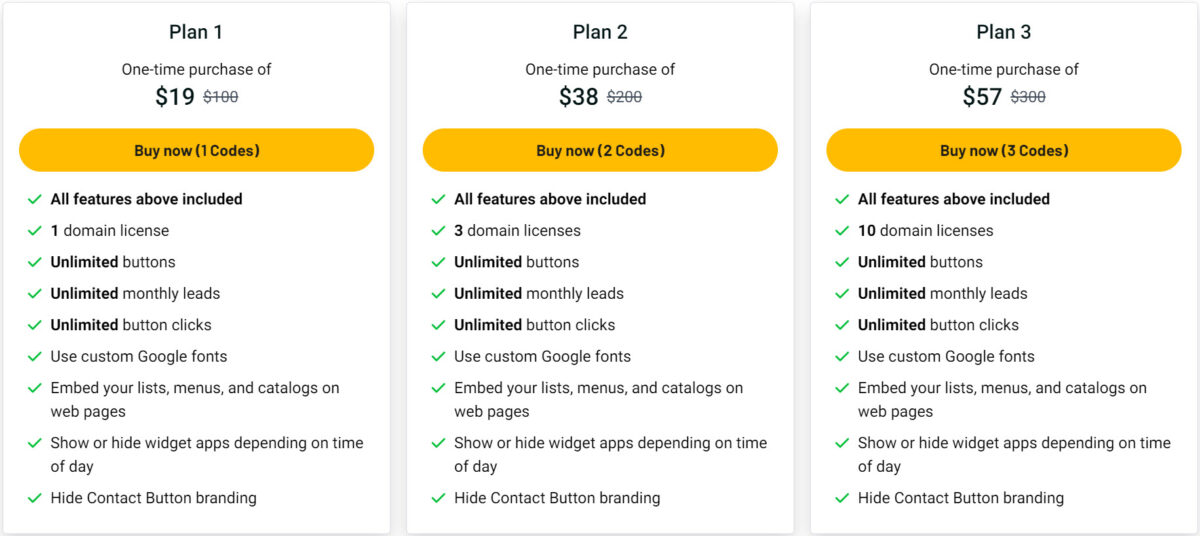
The Contact Button Lifetime Deal aims to provide a cost-effective solution for businesses looking to enhance their website’s functionality and user engagement. Here are the pricing details:
| Plan | Price | Features |
|---|---|---|
| Plan 1 | $19 (Regular price: $100) | 1 domain license, unlimited buttons, leads, and button clicks, custom Google fonts, embed lists, menus, and catalogs on web pages, hide Contact Button branding |
| Plan 2 | $38 (Regular price: $200) | 3 domain licenses, unlimited buttons, leads, and button clicks, custom Google fonts, embed lists, menus, and catalogs on web pages, hide Contact Button branding |
| Plan 3 | $57 (Regular price: $300) | 10 domain licenses, unlimited buttons, leads, and button clicks, custom Google fonts, embed lists, menus, and catalogs on web pages, hide Contact Button branding |
Additionally, the deal includes a 60 Day Money-Back Guarantee, allowing you to try Contact Button for two months and get a full refund if it does not meet your expectations. This makes it a risk-free investment for marketing agencies, small businesses, and web design agencies looking to enhance their website’s engagement and lead generation capabilities.
Key Features Of Contact Button
The Contact Button is a powerful all-in-one website widget. It enhances user engagement and captures new leads efficiently. Below are the key features that make Contact Button an excellent choice for businesses.
Easy Integration With Websites
The Contact Button seamlessly integrates with popular tools such as Calendly, Mailchimp, tawk.to, WhatsApp, and WordPress. This integration ensures a smooth setup without needing a developer.
| Integration Tools | Benefits |
|---|---|
| Calendly | Easy appointment scheduling |
| Mailchimp | Efficient email marketing |
| tawk.to | Real-time chat support |
| Instant messaging | |
| WordPress | Seamless website integration |
Customizable Button Designs
The Contact Button offers a customizable interface. You can tailor the layout and colors to match your website’s design. You can also use custom Google fonts to further personalize the appearance.
- Dynamic interface with 15 widget apps
- Customizable layout and colors
- Custom Google fonts
Real-time Customer Engagement
The Contact Button enhances user engagement by providing a smartphone-like experience. It includes features like contact forms and booking tools. These tools make navigation intuitive and engaging for visitors.
- Contact forms
- Booking tools
- Email subscriptions
- Business hours
Multi-channel Contact Options
The Contact Button provides multiple contact methods to cater to visitor preferences. It includes features like WhatsApp, email, and live chat, ensuring visitors can reach out through their preferred channel.
- Live chat
- Phone calls
These features make the Contact Button a versatile and user-friendly tool for enhancing website functionality and engagement.
Pricing And Affordability
The Contact Button offers an affordable solution to enhance user engagement and lead generation. Let’s delve into its pricing structure and see how it stands out in the market.
One-time Payment Vs Subscription
Contact Button provides a one-time payment model, eliminating the need for recurring fees. This is a significant advantage over traditional subscription-based services that may charge monthly or annually.
| Plan | Price | Features |
|---|---|---|
| Plan 1 | $19 (Regular price: $100) |
|
| Plan 2 | $38 (Regular price: $200) |
|
| Plan 3 | $57 (Regular price: $300) |
|
Comparison With Competitors
Compared to alternatives like Drift, Linktree, and Typeform, Contact Button is more cost-effective. Competitors often require monthly subscriptions, which can add up over time. Contact Button’s one-time payment saves money in the long run.
- Drift: Monthly subscription required
- Linktree: Monthly subscription required
- Typeform: Monthly subscription required
Long-term Savings
With Contact Button, you pay once and enjoy lifetime access. This translates to significant long-term savings. For instance, if you opt for Plan 1 at $19, you avoid ongoing fees, unlike subscription models that could cost hundreds annually.
Moreover, the 60-day money-back guarantee ensures a risk-free investment. If it doesn’t meet your expectations, you can get a full refund within two months.
In summary, Contact Button’s pricing is straightforward, affordable, and designed to offer long-term value.

Credit: www.linkedin.com
Pros And Cons Of Contact Button
The Contact Button is an all-in-one website widget designed to boost engagement and capture leads. It offers various features and benefits but also has potential drawbacks. Let’s explore the advantages and disadvantages of using the Contact Button.
Advantages Of Using Contact Button
The Contact Button provides several benefits that can enhance user experience and lead generation:
- Customizable Widget Menu: Users can access 15 widget apps, including contact forms and email subscriptions, from a single interface.
- Integrations: It seamlessly integrates with popular tools like Calendly, Mailchimp, tawk.to, WhatsApp, and WordPress.
- User-Friendly Setup: Easy to set up without needing a developer, making it accessible for small businesses and agencies.
- Customizable Interface: Tailor the layout and colors to match your website’s design.
- Multi-Functionality: Includes features like contact forms and booking tools, turning every page into a lead generator.
- Enhanced User Engagement: Provides a smartphone-like experience on your website, making navigation intuitive and engaging.
- Increased Interactions: Offers multiple contact methods to cater to visitor preferences.
- Lead Generation: Integrates tools that help convert visitors into leads.
Potential Drawbacks
While the Contact Button offers numerous benefits, there are a few potential drawbacks to consider:
- Cost: Although it offers a cost-effective solution, the pricing plans may still be a consideration for very small businesses or startups.
- Feature Overload: With 15 widget apps, some users might find the interface overwhelming or complicated to navigate initially.
- Limited Branding Options: Despite offering customization, some users may find the branding options limited without further development.
Overall, the Contact Button provides a user-friendly and customizable solution for enhancing website engagement and lead generation. Evaluate the pros and cons to determine if it fits your needs.
Ideal Users And Scenarios
The Contact Button is a versatile tool that fits various user needs. It is designed to boost engagement and capture new leads through its all-in-one website widget. Let’s explore who benefits the most from this tool and specific scenarios where it shines.
Businesses That Benefit Most
Several types of businesses can gain significant advantages from using the Contact Button:
- Marketing Agencies: Agencies can use it to streamline client interactions and enhance lead generation.
- Small Businesses: They benefit from the easy setup and customizable features to attract more customers.
- Web Design Agencies: These agencies can integrate it seamlessly into client websites, improving user engagement.
Specific Use Cases
The Contact Button offers a variety of applications, making it suitable for multiple scenarios:
- Lead Generation: Businesses can use the customizable widget menu to capture leads effectively.
- Customer Support: Integrate tools like tawk.to and WhatsApp to provide instant customer support.
- Appointment Booking: Use integrations like Calendly to allow visitors to book appointments effortlessly.
- Email Subscriptions: Grow your email list by integrating with Mailchimp for easy subscriptions.
By leveraging these features, businesses can create a more engaging and interactive website experience for their visitors.

Credit: www.linkedin.com
Conclusion And Call To Action
The Contact Button Lifetime Deal offers immense value for anyone aiming to boost website engagement and lead generation. This all-in-one widget brings a host of customizable tools to your fingertips, ensuring a seamless experience for your visitors. Below, we summarize the key benefits and guide you on how to grab this lifetime deal.
Summary Of Benefits
- Enhanced User Engagement: Contact Button provides a smartphone-like experience, making navigation easy and engaging.
- Increased Interactions: Offers various contact methods to suit visitor preferences, leading to better interaction rates.
- Lead Generation: Integrates tools that effectively turn website pages into lead generators.
- Seamless Integration: Easily integrates with popular tools like Calendly, Mailchimp, WhatsApp, and WordPress.
- User-Friendly Setup: Simple setup process without the need for a developer, making it accessible for all users.
- Customizable Interface: Tailor the widget’s layout and colors to match your website’s design seamlessly.
How To Get The Lifetime Deal
Securing the Contact Button Lifetime Deal is straightforward. Follow these steps to get started:
- Visit the Contact Button Lifetime Deal page.
- Choose from one of the three pricing plans that best suits your needs:
- 1 domain license
- Unlimited buttons, leads, and button clicks
- Custom Google fonts
- Embed lists, menus, and catalogs
- Hide Contact Button branding
- 3 domain licenses
- Unlimited buttons, leads, and button clicks
- Custom Google fonts
- Embed lists, menus, and catalogs
- Hide Contact Button branding
- 10 domain licenses
- Unlimited buttons, leads, and button clicks
- Custom Google fonts
- Embed lists, menus, and catalogs
- Hide Contact Button branding
- Click the “Buy Now” button and complete your purchase.
- Enjoy a 60 Day Money-Back Guarantee to ensure satisfaction.
| Plan | Price | Features |
|---|---|---|
| Plan 1 | $19 (Regular price: $100) |
|
| Plan 2 | $38 (Regular price: $200) |
|
| Plan 3 | $57 (Regular price: $300) |
|
Don’t miss out on this opportunity to enhance your website’s functionality and engagement. Get the Contact Button Lifetime Deal today!
Credit: lifetimo.com
Frequently Asked Questions
What Is The Contact Button Lifetime Deal?
The Contact Button Lifetime Deal offers a one-time purchase for lifetime access to all features. It eliminates recurring subscription costs, providing long-term savings.
How Does Contact Button Improve User Engagement?
Contact Button enhances user engagement by providing an easy way for visitors to reach you. It integrates seamlessly, encouraging more interactions and conversions.
Is The Contact Button Lifetime Deal Worth It?
Yes, the Contact Button Lifetime Deal is worth it. It offers lifetime access, saving you money and providing constant updates and support.
What Features Are Included In The Contact Button Lifetime Deal?
The Contact Button Lifetime Deal includes customizable buttons, multiple contact options, analytics, and priority support. It ensures a comprehensive communication solution.
Conclusion
Contact Button is a smart choice for boosting website engagement and lead generation. Its customizable widgets and seamless integrations make it easy to use. Small businesses and agencies will find it especially useful. With affordable pricing plans and a 60-day money-back guarantee, it’s risk-free to try. Enhance your website’s functionality today with Contact Button. For more details, visit the Contact Button Lifetime Deal.
