
Capturing and editing videos can be a tedious task, but not anymore. Introducing the Screentovideo Lifetime Deal, your go-to solution for effortless video creation.
ScreenToVideo is a powerful tool designed for content creators, offering robust screen recording and video editing features. Capture your screen, record audio and webcam, and even sketch on your screen. The user-friendly interface makes it easy to create professional videos quickly. With export options and Google Drive integration, sharing your creations is a breeze. Whether you are a course creator, small business owner, or content creator, ScreenToVideo offers everything you need. Plus, with a one-time payment, you get lifetime access to all future updates. Ready to elevate your video creation game? Check out the deal here.
Credit: bestlifetimedeals.com
Introduction To Screentovideo
ScreenToVideo is a powerful and easy-to-use screen recorder and video editor. It helps content creators record, edit, and share videos effortlessly. This tool is designed for anyone who needs to create engaging video content quickly and efficiently.
Overview Of Screentovideo
ScreenToVideo offers a range of features to meet various video creation needs:
- Screen Recording: Capture a window, chosen area, or the entire screen.
- Audio & Webcam Recording: Record voice, system sounds, and webcam with virtual backgrounds.
- Sketching Tools: Turn your screen into a whiteboard and record animated GIFs.
- Video Editing: Add text areas, video effects, and use Google Text-To-Speech.
- Export Options: Export videos in MP4, WMV, GIF, or MP3 formats.
- Google Drive Integration: Upload and share videos directly to Google Drive.
- Professional Tools: Use closed captions, audio normalization, and hardware-accelerated encoders.
Purpose And Target Audience
The main purpose of ScreenToVideo is to provide a user-friendly platform for video creation. It caters to different user needs with its flexible recording modes and quick export options. The interactive tutorials feature allows users to annotate videos with events for fully interactive tutorials.
ScreenToVideo is ideal for:
- Content Creators: Those who need to record and edit high-quality videos.
- Course Creators: Educators who want to produce engaging and interactive tutorials.
- Small Businesses: Companies looking to create professional videos for marketing or training purposes.
Additionally, the platform offers comprehensive support, including in-app and website support, with free lifetime upgrades. This makes it a reliable tool for long-term use. The pricing is also attractive, with a one-time payment of $59, which is 50% off the original price of $119, and includes lifetime access to all future updates and features.
With a 60-day money-back guarantee, users can try ScreenToVideo risk-free. It is a suitable alternative to Loom and integrates seamlessly with Google Drive. Being GDPR-compliant adds to its reliability and trustworthiness.
| Feature | Details |
|---|---|
| Screen Recording | Capture a window, area, or entire screen |
| Audio & Webcam Recording | Record voice, system sounds, and webcam |
| Sketching Tools | Turn screen into whiteboard, record GIFs |
| Video Editing | Add text areas, video effects, Google Text-To-Speech |
| Export Options | MP4, WMV, GIF, or MP3 formats |
| Google Drive Integration | Upload and share directly |
| Professional Tools | Closed captions, audio normalization, hardware-accelerated encoders |
Key Features Of Screentovideo
ScreenToVideo offers a versatile set of features designed to make video recording and editing simple and efficient. Whether you’re a content creator, course instructor, or small business, ScreenToVideo has the tools to meet your needs. Below, we delve into the key features that make ScreenToVideo a powerful tool for all your video creation needs.
Advanced Screen Recording
ScreenToVideo allows you to capture a window, chosen area, or the entire screen. This flexibility ensures you can record exactly what you need. The built-in screen recorder also supports audio and webcam recording, enabling you to capture voice, system sounds, and webcam footage simultaneously. For added creativity, you can use virtual backgrounds during webcam recordings.
Built-in Video Editor
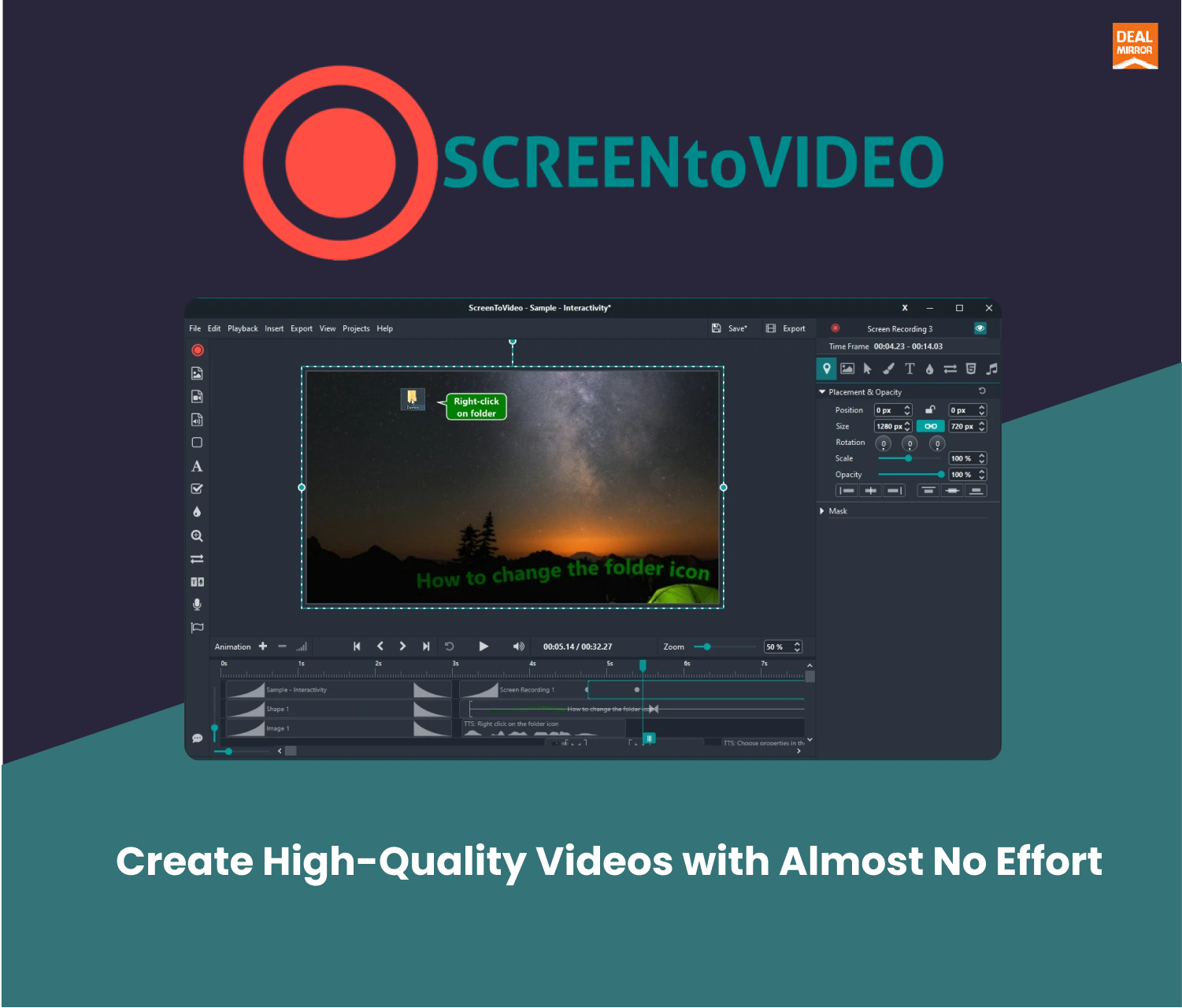
The built-in video editor includes a variety of components to enhance your videos. You can add text areas, video effects, and even integrate Google Text-To-Speech. This makes it easy to create professional-looking videos without needing additional software. The intuitive design with icons and texts ensures a user-friendly experience.
Customizable Annotations
With ScreenToVideo, you can turn your screen into a whiteboard using flexible sketching tools. This feature is perfect for creating interactive tutorials. You can annotate your videos with events, making them fully interactive and engaging. Additionally, you can record animated GIFs for quick, shareable content.
Seamless Audio Integration
Audio recording is seamless with ScreenToVideo. You can record voice, system sounds, and add closed captions. The tool also offers audio normalization to ensure consistent sound quality. This is crucial for maintaining professional audio standards in your videos.
Export Options And Formats
ScreenToVideo supports a wide range of export options. You can export your videos in MP4, WMV, GIF, or MP3 formats. This flexibility ensures that your videos are compatible with various platforms and devices. Additionally, you can upload and share videos directly to Google Drive, making collaboration and sharing straightforward.
ScreenToVideo offers a comprehensive set of features designed to make video creation easy and efficient. With its powerful screen recording, built-in video editor, customizable annotations, seamless audio integration, and versatile export options, ScreenToVideo is an excellent tool for anyone looking to create high-quality videos.
Pricing And Affordability
ScreenToVideo offers a compelling pricing model that ensures affordability without compromising on features. This section explores the lifetime deal, compares it with competitors, and highlights the exceptional value it offers.
Lifetime Deal Overview
The ScreenToVideo Lifetime Deal is currently available for a one-time payment of $59. This is a 50% discount from the original price of $119. With this purchase, users get lifetime access to all current and future features of ScreenToVideo. This includes all updates and enhancements, making it a cost-effective solution for long-term use.
Cost Comparison With Competitors
To understand the value of ScreenToVideo, it’s useful to compare it with similar tools in the market:
| Product | Pricing | Features |
|---|---|---|
| ScreenToVideo | $59 (Lifetime) | Screen Recording, Audio & Webcam Recording, Video Editing, Google Drive Integration |
| Loom | $8/month (Annual Plan) | Screen & Webcam Recording, Team Collaboration |
| Camtasia | $249 (One-Time) | Screen Recording, Advanced Video Editing, Annotations |
ScreenToVideo offers a more affordable one-time payment compared to Loom’s ongoing subscription and Camtasia’s high initial cost.
Value For Money
With ScreenToVideo, users get a multitude of features at a fraction of the cost. Some of the key benefits include:
- User-Friendly Interface: Easy navigation with intuitive icons and texts.
- Quick Recording & Exporting: Immediate video creation with no export time.
- Flexible Recording Modes: Capture specific windows, areas, or the entire screen.
- Interactive Tutorials: Annotate videos with events for engaging tutorials.
- Comprehensive Support: Access to in-app and website support, plus free lifetime upgrades.
The 60-day money-back guarantee further adds to the value, offering a risk-free opportunity to evaluate the tool.
Credit: www.youtube.com
Pros And Cons Of Screentovideo
Screentovideo offers a range of features designed to help content creators record, edit, and share videos effortlessly. This section will explore the pros and cons of using Screentovideo, helping you understand its benefits and limitations.
Advantages Of Using Screentovideo
- Screen Recording: Capture a window, chosen area, or the entire screen.
- Audio & Webcam Recording: Record voice, system sounds, and webcam with virtual backgrounds.
- Sketching Tools: Turn your screen into a whiteboard and record animated GIFs.
- Video Editing: Includes text areas, video effects, and Google Text-To-Speech integration.
- Export Options: Export videos in MP4, WMV, GIF, or MP3 formats.
- Google Drive Integration: Upload and share videos directly to Google Drive.
- Professional Tools: Closed captions, audio normalization, and hardware-accelerated encoders.
- User-Friendly Interface: Intuitive design with icons and texts.
- Quick Recording & Exporting: No export time for immediate video creation.
- Flexible Recording Modes: Suitable for different user needs.
- Interactive Tutorials: Annotate videos with events for interactive tutorials.
- Comprehensive Support: In-app and website support, free lifetime upgrades.
Limitations And Areas For Improvement
- Learning Curve: Some users might find it overwhelming initially.
- Limited Integrations: Primarily integrates with Google Drive only.
- Non-Stackable Deal: Cannot stack multiple lifetime deals.
- Refund Policy: Only refundable within 60 days.
Screentovideo is a robust tool with many advantages for content creators. Despite its limitations, it remains a valuable asset for recording, editing, and sharing videos.
Ideal Users And Scenarios
ScreenToVideo is a versatile tool designed to meet diverse needs. Its features cater to various users and scenarios. This section explores the best use cases and identifies who benefits the most from this lifetime deal.
Best Use Cases For Screentovideo
ScreenToVideo is perfect for different applications. Here are some of the best use cases:
- Content Creation: Create engaging video content with ease.
- Online Courses: Record and edit tutorials for educational purposes.
- Business Presentations: Craft professional presentations with integrated screen and audio recordings.
- Marketing: Produce marketing videos to promote products or services.
- Technical Support: Develop clear, step-by-step instructional videos for customer support.
Who Will Benefit The Most?
Various groups will find ScreenToVideo highly beneficial. Here’s a breakdown:
| User Group | Benefits |
|---|---|
| Content Creators | Easy-to-use tools to record, edit, and share high-quality videos. |
| Course Creators | Comprehensive tools for creating interactive educational content. |
| Small Businesses | Affordable solution for creating professional marketing and training videos. |
| Freelancers | Flexible recording modes and quick exporting for client projects. |
| Technical Support Teams | Effective video tutorials to enhance customer support. |
Credit: bestlifetimedeals.com
Frequently Asked Questions
What Is The Screentovideo Lifetime Deal?
The Screentovideo Lifetime Deal offers a one-time purchase for lifetime access to the software. This deal provides users with ongoing updates and support without any recurring fees.
How Much Does Screentovideo Lifetime Deal Cost?
The cost of the Screentovideo Lifetime Deal varies based on the promotion. Typically, it is offered at a significant discount compared to regular subscription prices.
Is The Screentovideo Lifetime Deal Worth It?
Yes, the Screentovideo Lifetime Deal is worth it. It provides lifetime access to powerful screen recording and video editing features. Users benefit from ongoing updates and support.
What Features Are Included In Screentovideo Lifetime Deal?
The Screentovideo Lifetime Deal includes screen recording, video editing, annotations, and exporting options. It also offers regular updates and customer support.
Conclusion
ScreenToVideo offers a comprehensive solution for video recording and editing. It’s user-friendly and suitable for content creators and small businesses. With features like screen and audio recording, video editing, and Google Drive integration, it meets all your needs. The one-time payment deal provides lifetime access, making it a valuable investment. Explore the Screentovideo Lifetime Deal today and streamline your video creation process. Enjoy a 60-day money-back guarantee if you’re not satisfied. Don’t miss this opportunity to enhance your content creation effortlessly.
